➽ Lets make some fun using Linux
10 Funny Commands of Linux or Linux is Fun in Terminal
1. Command: sl (Steam Locomotive)
You might be aware of command ‘ls‘ the list command and use it frequently to view the contents of a folder but because of miss-typing sometimes you would result in ‘sl‘, how about getting a little fun in terminal and not “command not found“.Install sl
root@tecmint:~# apt-get install sl   (In Debian like OS)
root@tecmint:~# yum -y install sl   (In Red Hat like OS)
Output
root@tecmint:~# sl

2. Command: telnet
No! No!! it is not as much complex as it seems. You would be familiar with telnet. Telnet is a text-oriented bidirectional network protocol over network. Here is nothing to be installed. What you should have is a Linux box and a working Internet.input
root@tecmint:~# telnet towel.blinkenlights.nl

3. Command: fortune
what about getting your random fortune, sometimes funny in terminal.Install fortune
root@tecmint:~# apt-get install fortune  (for aptitude based system)
root@tecmint:~# yum install fortune   (for yum based system)
root@tecmint:~# fortune
You're not my type.  For that matter, you're not even my species!!!
Future looks spotty.  You will spill soup in late evening.
You worry too much about your job.  Stop it.  You are not paid enough to worry.
Your love life will be... interesting.
4. Command: rev (Reverse)
It reverse every string given to it, is not it funny.root@tecmint:~# rev 123abc cba321 xuniL eb ot nrob born to be Linux
5. Command: factor
Time for some Mathematics, this command output all the possible factors of a given number.root@tecmint:~# factor 5 5 5: 5 12 12: 2 2 3 1001 1001: 7 11 13 5442134 5442134: 2 2721067
6. Command: oneko
OK so you believe that mouse pointer of Linux is the same silly black/white pointer where no animation lies then I fear you could be wrong. “oneko“ is a package that will attach a “Jerry“ with you mouse pointer and moves along with you pointer.Install oneko
root@tecmint:~# apt-get install oneko
root@tecmint:~# yum install oneko
Output
root@tecmint:~# oneko

7. Command: Cowsay
An ASCII cow in terminal that will say what ever you want.Install Cowsay
root@tecmint:~# apt-get install cowsay (for Debian based OS) root@tecmint:~# yum install cowsay (for Red Hat based OS)Output
root@tecmint:~# cowsay I Love nix ____________ < I Love nix > ------------ \ ^__^ \ (oo)\_______ (__)\ )\/\ ||----w | || || How about pipelineing ‘fortune command‘, described above with cowsay?root@tecmint:~# fortune | cowsay _________________________________________ / Q: How many Oregonians does it take to \ | screw in a light bulb? A: Three. One to | | screw in the light bulb and two to fend | | off all those | | | | Californians trying to share the | \ experience. / ----------------------------------------- \ ^__^ \ (oo)\_______ (__)\ )\/\ ||----w | || ||
Note: ‘|‘ is called pipeline instruction and it is used where the output of one command needs to be the input of another command. In the above example the output of ‘fortune‘ command acts as an input of ‘cowsay‘ command. This pipeline instruction is frequently used in scripting and programming.
xcowsay is a graphical program which response similar to cowsay but in a graphical manner, hence it is X of cowsay.
apt-get install xcowsay yum install xcowsay
Output
root@tecmint:~# xcowsay I Love nix
xcowsay command
apt-get install cowthink yum install cowthink
Output
root@tecmint:~# cowthink ....Linux is sooo funny _________________________ ( ....Linux is sooo funny ) ------------------------- o ^__^ o (oo)\_______ (__)\ )\/\ ||----w | || ||8. Command: yes
It is funny but useful as well, specially in scripts and for System Administrators where an automated predefined response can be passed to terminal or generated.root@tecmint:~# yes I Love Linux I Love Linux I Love Linux I Love Linux I Love Linux I Love Linux I Love Linux I Love Linux I Love Linux I Love Linux I Love Linux I Love Linux I Love Linux Note: (Till you interrupt i.e ctrl+c).
9. Command: toilet
what? Are u kidding, huhh no! Definitely not, but for sure this command name itself is too funny, and I don’t know from where this command gets it’s name.Install toilet
root@tecmint:~# apt-get install toilet root@tecmint:~# yum install toiletOutput
root@tecmint:~# toilet tecmint mmmmmmm " m # mmm mmm mmmmm mmm m mm mm#mm mmm mmm mmmmm # #" # #" " # # # # #" # # #" " #" "# # # # # #"""" # # # # # # # # # # # # # # # "#mm" "#mm" # # # mm#mm # # "mm # "#mm" "#m#" # # # It even offers some kind of color and fonts style.root@tecmint:~# toilet -f mono12 -F metal Tecmint.com
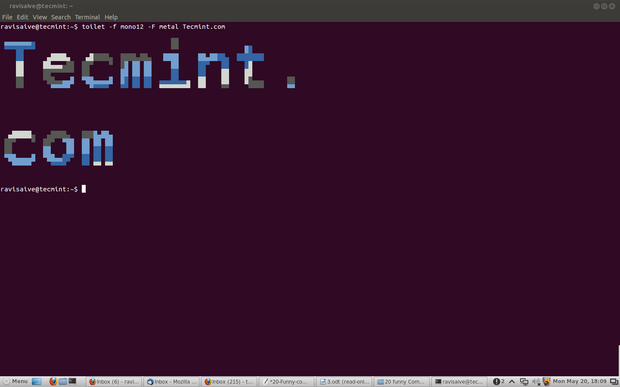
toilet command
10. Command: cmatrix
You might have seen Hollywood movie ‘matrix‘ and would be fascinated with power, Neo was provided with, to see anything and everything in matrix or you might think of an animation that looks alike Hacker‘s desktop.Install cmatrix
root@tecmint:~# apt-get install cmatrix root@tecmint:~# yum install cmatrixOutput
root@tecmint:~# cmatrix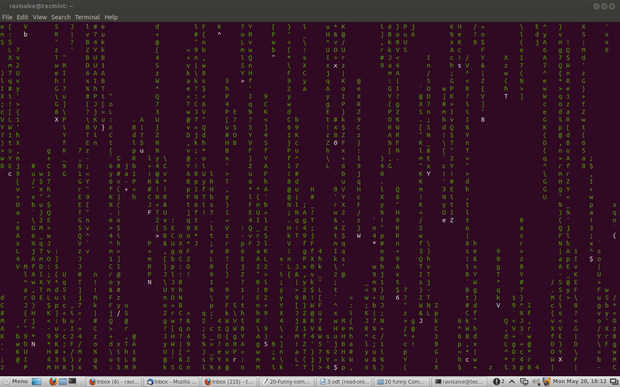
cmatrix command

Comments
Post a Comment